12 Common Cartoning Machine Problems and How to Fix Them
Cartoning machine problems can bring an entire packaging line to a standstill — and every hour of downtime costs money. The good news: most cartoner failures come from a short list of root causes, and your operators can diagnose and fix the majority of them in minutes without waiting for an engineer. In this guide, we break down the 12 most common automatic cartoner problems, what causes them, and exactly how to fix each one, based on 15+ years of building cartoning lines for food, pharmaceutical, and cosmetic products.
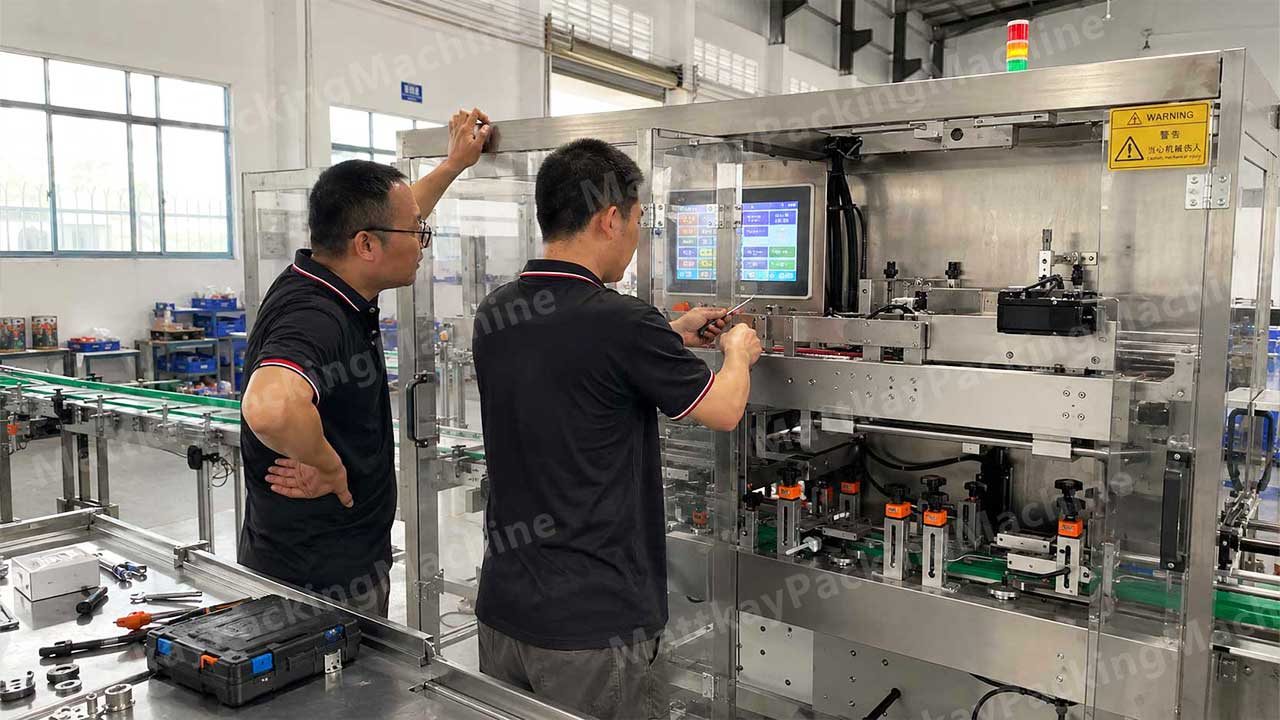
Mattkay engineers diagnosing a cartoning machine fault on-site — most fixes take minutes once you identify the root cause.
Quick Diagnosis Table: Find Your Problem in 10 Seconds
Symptom
Most Likely Cause
Jump to Fix
Carton won't open or opens halfway
Vacuum failure / worn suction cups
Problem #1
Cartons jam in the magazine
Carton stack preparation or guide width
Problem #2
Cartons feed crooked or skew
Chain / lug misalignment
Problem #3
Leaflet misses or folds badly
Leaflet suction and fold roller gap
Problem #4
Product missing or crushed in box
Pusher timing / sensor fault
Problem #5
Flaps won't tuck or close
Product size vs. box size mismatch
Problem #6
Glue seal fails or leaks
Glue temperature / nozzle blockage
Problem #7
Carton position drifts during travel
Worn belts, chains, or guides
Problem #8
Machine stops randomly mid-run
Sensor fouling / air pressure drop
Problem #9
Machine won't start at all
Safety circuit / E-stop condition
Problem #10
Excess noise or vibration
Lubrication / loose fasteners
Problem #11
Everything fails after a size changeover
Incomplete changeover procedure
Problem #12
Problem #1: The Carton Won't Open (or Opens Only Halfway)
This is the single most common complaint we hear from new cartoner owners. The suction cups pick the carton from the magazine, but the box doesn't pop open cleanly, or it pulls out and immediately collapses.
Causes and fixes:
Worn or dirty suction cups. Rubber cups crack and lose grip over time. Inspect cups weekly and replace them as a consumable, not when they fail completely. Clean cups with isopropyl alcohol — dust from carton board kills vacuum performance fast.
Insufficient vacuum pressure. Check the vacuum gauge: most horizontal cartoners need around −0.06 MPa or better at the cup. Trace the lines for leaks, clean the vacuum generator, and verify your plant air supply is stable.
Carton blank quality. If the crease (score) depth is too shallow, the box resists opening; if it's too deep, blanks tear. Carton blanks stored for months in humid conditions also "relax" and stick together. Ask your carton supplier to pre-fold or pre-break the blanks, and store them in a dry, climate-controlled area.
Wrong pick timing. If the cup lifts before the vacuum stabilizes, the carton peels off the stack unevenly. Adjust the suction delay by 50–100 ms.
Problem #2: Cartons Jam Inside the Magazine
Boxes pile up, deform, and wedge between the magazine walls — often at the worst possible moment, like 10 minutes after you've finally hit target speed.
Causes and fixes:
Cartons stacked carelessly. Train operators to fan and tap each stack before loading. Bent or glued-together blanks are the #1 jam source.
Magazine guide width wrong. The gap should be the carton blank width plus roughly 1–2 mm. Too tight squeezes and binds the stack; too loose lets blanks tilt and mis-feed.
Low stack pressure. The back plate or weight should keep constant light pressure on the stack. Without it, the bottom cartons slide while the top ones stay put.
Carton cut quality. Burrs or rough die-cut edges catch on each other. If jams cluster around one carton batch, quarantine that batch and check with your supplier.
Problem #3: Cartons Feed Crooked or Skew Down the Chain
Straight feeding is everything — a skew box at the loading station guarantees a bad downstream result, from missing inserts to crushed flaps.
Causes and fixes:
Worn or stretched chain/lugs. Chains stretch with use; when the pitch drifts, cartons no longer seat squarely. Check chain tension and replace stretched sections.
Guide rails not parallel. Measure rail width at several points along the conveyor — it must be constant. Re-square the rails after any changeover.
Foreign objects. A stray scrap of board under the track causes rhythmic skipping. Clean the track as part of every shift start.
Problem #4: Leaflet Problems — Missed Suction, Double Feeding, Bad Folds
For pharmaceutical and cosmetic lines, the leaflet station is usually the most sensitive. Common symptoms: the leaflet suction can't pick a sheet, picks two at once, or folds them crooked.
Causes and fixes:
Leaflet pile not fanned / paper static. Fan the pile at every reload. In dry winter conditions, static makes sheets cling — a static eliminator bar solves this permanently.
Separator hook gap wrong. Set the gap to roughly 0.5 mm so only the top sheet is released per cycle.
Worn suction nozzles. Same rule as carton cups: clean, inspect, and replace on schedule.
Fold roller gap incorrect. For each leaflet thickness, adjust the roller gap and clear any debris from the fold plates. Test with 10 sheets and check fold alignment before running at speed.
Paper quality. Humid or curling leaflets will never run clean. Specify leaflet paper and moisture limits in your packaging material specs.
Problem #5: Product Missing, Duplicated, or Crushed in the Carton
When the pusher or transfer mechanism loads product, mis-sync between product infeed and carton position is almost always the root cause.
Causes and fixes:
Timing misalignment. Re-synchronize the product infeed with carton position. On servo cartoners, verify the encoder offset after any maintenance.
Faulty or dirty product sensor. Wipe photo-eye lenses every shift; replace sensors that flutter intermittently.
Inconsistent product spacing. Add or adjust the guide rails on the infeed so products arrive with uniform pitch and orientation.
Pusher speed too high. Slow the push stroke slightly for fragile products like blister stacks or cosmetics — the speed loss is negligible, and rejected packs drop to near zero.
Problem #6: Flaps Won't Tuck or Close Properly
The box is loaded, but the tucking arms miss the flaps, or the small flap catches and tears.
Causes and fixes:
Box size too small for the product. If the product bulges, flaps can't close. Rule of thumb: product volume should leave 2–3 mm of clearance on each dimension. See our guide to selecting the right cartoner for your factory for sizing formulas.
Tucking arm timing or height offset. Re-align the arms after verifying carton height on the chain.
Crease depth on the closing panel. Coordinate with your carton supplier — deep, crisp scores make tucking dramatically more reliable.
Problem #7: Glue Seal Fails or Leaks
Hot-melt glue systems cause relatively few problems when maintained, but when they misbehave they can reject an entire batch.
Causes and fixes:
Glue temperature drift. Verify setpoint against actual nozzle temperature with a probe. A 10–15 °C drop is enough to cause weak, fibrous seals.
Clogged or worn nozzles. Clean nozzles on the manufacturer's schedule, and filter the glue supply. Replace nozzles that show a distorted glue pattern.
Glue bead position wrong. The bead should land centered on the flap, about 2 mm from the fold line, and be compressed by the closing station — not wiped off by it.
Compressed flap or uneven closing pressure. Check the closing station rollers for wear and verify even pressure across the flap.
Problem #8: Carton Position Drifts During Travel
Everything worked at commissioning, but weeks later cartons arrive at the loading station slightly early or late.
Causes and fixes:
Worn drive belts or feed belts. Replace belts showing glazing or cracking; verify tension (a light thumb press should deflect the belt only a few millimeters).
Chain tension uneven between sides. Both chains must move in perfect sync — check and equalize tension.
Photocell for carton detection misaligned. After any mechanical work, re-align the detection sensor and re-verify timing with a test batch.
Problem #9: The Machine Stops Randomly Mid-Run
Random stoppages are frustrating because there's no single obvious fault. Work through this list:
Sensors fouled by dust or board fibers. The machine "thinks" something is wrong and stops protectively. Clean all photo-eyes and proximity switches on schedule.
Air pressure dips below threshold. If another machine in the plant cycles at the same time, your cartoner may lose pressure momentarily. Check your compressor capacity and add a local receiver tank if needed.
Loose connectors or aging wiring. Vibration loosens terminals. Have an electrician torque-check the cabinet annually.
Missing product / low-level alarms. Confirm the alarm history on the HMI — the PLC usually logs exactly which condition triggered each stop. Reviewing this log weekly is the fastest way to find chronic issues.
Problem #10: The Machine Won't Start at All
Before calling service, check these in order — this list resolves most "dead machine" calls within five minutes:
Emergency stop buttons: any one of them pressed anywhere on the line?
Safety doors and guards: all closed and latched?
Air supply: pressure at the machine inlet at or above the spec (typically 0.6 MPa)?
Product / material level: low-level sensors triggering?
Overload relay tripped in the cabinet?
Power: all three phases present, voltage within ±5%?
Problem #11: Excessive Noise or Vibration
Noise is an early-warning system. Machines tell you they're failing before they stop.
Dry bearings and chains. Follow the lubrication chart religiously — most builders specify weekly greasing of cam and conveyor bearings. Over-greasing attracts dust, so use the specified quantity.
Loose fasteners from vibration. Walk the machine monthly with a torque wrench on critical fasteners, especially after the first month of a new installation.
Worn cam followers. On cam-driven cartoners, worn followers cause a distinctive knock and eventually damage the cam. Replace them preventively.
Problem #12: Everything Fails After a Size Changeover
If the machine ran beautifully on product A and falls apart on product B, the changeover was incomplete.
Best practice: Use a written changeover checklist specific to your machine — magazine guides, chain height, product rails, pusher position, flap tuckers, glue positions, sensors. Photograph the settings for each SKU and label them on the machine. A disciplined 20-minute changeover beats a rushed 8-minute one that costs 4 hours of jamming. If changeovers are frequent and painful, it may be time to consider a fully automatic cartoner with servo-adjusting changeover.
Preventive Maintenance Checklist for Cartoning Machines
Ninety percent of the problems above are preventable. Here's the schedule we give our own customers:
Frequency
Tasks
Every shift
Clean photo-eyes and suction cups; clear board dust; verify air pressure; check the first 20 cartons visually
Weekly
Lubricate per chart; inspect suction cups and belts; check chain tension; review HMI alarm history
When Carton Quality Is the Real Problem (Not the Machine)
Before blaming the machine, audit the packaging material. We estimate that roughly a third of "machine problems" trace back to carton blanks:
Crease depth: specify it in writing with your supplier (typically ≥1.5 mm score depth for cartoner-grade blanks).
Moisture: board that absorbed humidity stiffens and jams. Keep blanks wrapped until loading, and store at stable humidity.
Dimensional tolerance: blanks outside ±2 mm of spec will fight the guides no matter how you adjust them.
Die-cut burrs: rough edges catch and tear — request clean die-cutting on your purchase spec.
Frequently Asked Questions
Why does my cartoning machine keep jamming?
The top three causes are carton quality (shallow creases, humidity-damaged or burred blanks), incorrect magazine guide width, and dirty/worn suction cups. Start by auditing the carton blanks and the vacuum system — these two areas resolve most chronic jamming.
What air pressure does a cartoning machine need?
Most automatic cartoners require a stable 0.6 MPa (87 psi) at the machine inlet, and the vacuum circuit typically needs −0.06 MPa or better for reliable carton opening. Pressure dips from shared compressors are a common hidden cause of random stops.
How often should I service an automatic cartoner?
Daily cleaning and checks, weekly lubrication, monthly fastener and sensor checks, and quarterly replacement of wear parts (suction cups, belts, glue nozzles). With this discipline, a quality cartoner runs 15–20 years or more.
How do I reduce cartoner downtime during changeovers?
Use a written, SKU-specific changeover checklist with photographed settings, and train two operators on it so it doesn't depend on one person. For lines changing size daily, a servo-driven cartoner that adjusts guides automatically typically pays back quickly.
Can a cartoning machine handle different box sizes on one line?
Yes. Most cartoners cover a size range through mechanical changeover, and fully automatic models adjust servos within minutes. What matters is that your SKUs fall within the machine's specified box dimension envelope — check this before purchase, not after.
Still Stuck? Get a Free Diagnosis from Our Engineers
If you've worked through the fixes above and a specific fault keeps coming back, send us a short video of the problem plus your box dimensions — our engineers will diagnose it free of charge, no strings attached. And if you're evaluating a new line, explore our full range of automatic cartoning machines or read our complete cartoner pricing guide to budget accurately. You can also request a customized quote with your product samples and target speed.
Mattkay (MTK) has manufactured automatic cartoning machines in China since 2014 — ISO9001 and CE certified, 30+ patents, with 300+ completed packaging line projects for food, pharmaceutical, cosmetic, and industrial products worldwide.
One comment on “12 Common Cartoning Machine Problems and How to Fix Them (Troubleshooting Guide)”
[…] with the machine costs 30-40% less than air-freighting individual parts after a breakdown. See our cartoning machine troubleshooting guide for which parts actually […]



[…] with the machine costs 30-40% less than air-freighting individual parts after a breakdown. See our cartoning machine troubleshooting guide for which parts actually […]